
Download Adebis Photo Sorter – photo sorter, organize photos, image organizer, sort photos by date, rename photos, file management, digital photo organization, photo management tool
Overview
Adebis Photo Sorter is a focused productivity tool designed to streamline the management of digital photo collections on Android devices. The app addresses a common challenge faced by smartphone users: the accumulation of disorganized, unstructured image files across multiple folders. By enabling users to sort and rename photos based on customizable criteria, it offers a practical solution for maintaining a clean and accessible digital archive. The primary purpose of the application is to automate the tedious process of manual photo organization, reducing time spent searching for specific images and minimizing digital clutter.
Target users include individuals with large photo libraries, such as amateur photographers, travelers, and everyday smartphone users who frequently capture and store images. The app is particularly beneficial for those who rely on consistent file naming and structured folder hierarchies for efficient retrieval. While the developer, Adebis, has not provided additional background information, the app’s longevity—released in April 2012—suggests a stable and enduring presence in the Android ecosystem. Its continued availability indicates a sustained utility for users seeking straightforward photo management without complex features or subscription models.
Real-world use cases include organizing vacation photos by date, categorizing images by file type (e.g., .jpg, .png), or renaming files to include metadata such as event names or locations. In the broader app ecosystem, Adebis Photo Sorter fills a niche for lightweight, no-frills tools that prioritize functionality over aesthetics, offering a reliable alternative to more feature-heavy photo management applications.
Key Features & Functionality
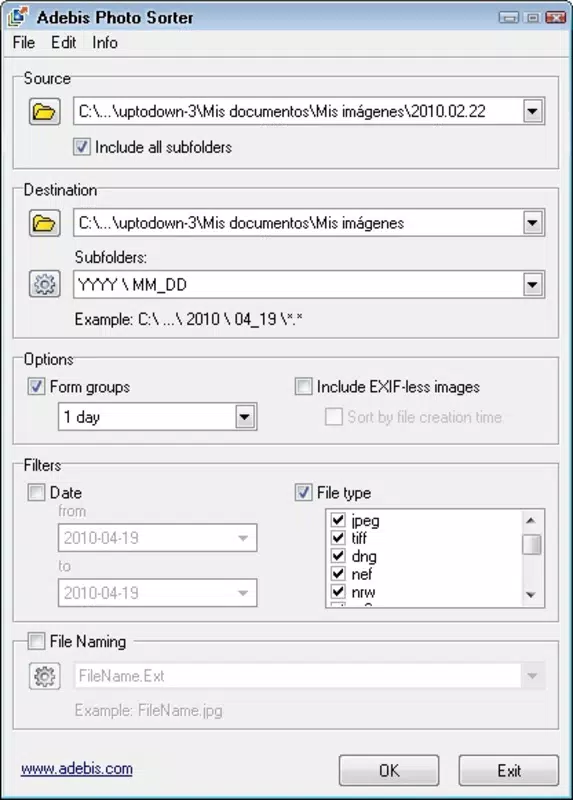
- Easy Folder Selection: Users can quickly choose any folder on their device to begin sorting. The intuitive selection process ensures accessibility even for users with limited technical experience, eliminating the need for advanced file system navigation.
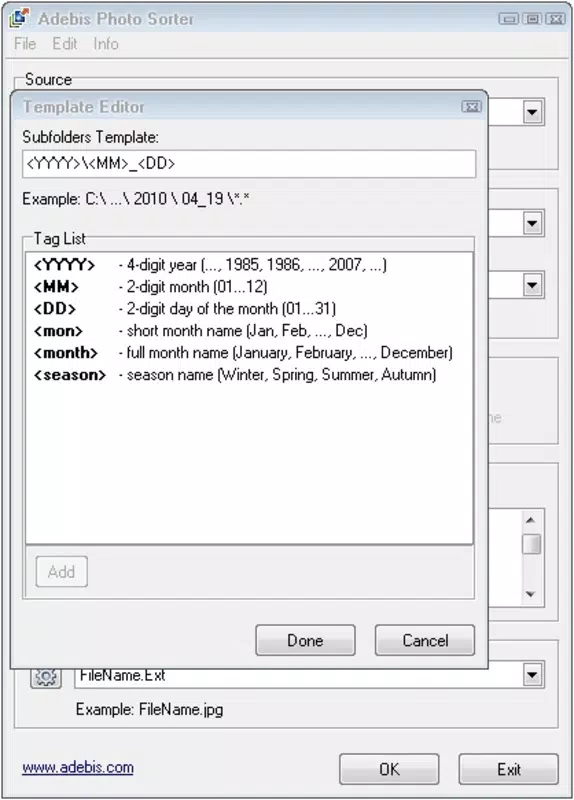
- Multiple Sorting Criteria: The app supports sorting by date and file extension, allowing users to group photos based on when they were taken or their format. This flexibility enables tailored organization strategies, such as separating raw images from processed ones or isolating photos from a specific event.
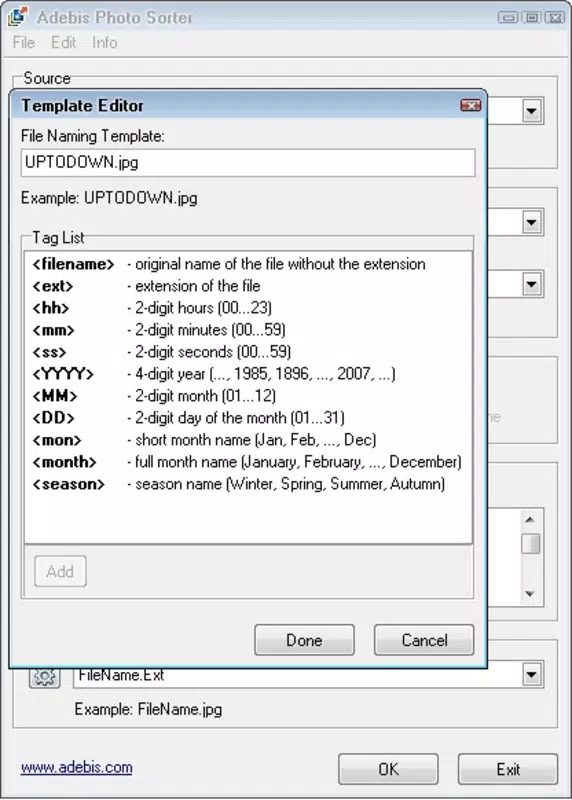
- Custom Naming Patterns: Users can define their own naming templates, applying consistent naming conventions across files. This feature enhances long-term accessibility, making it easier to identify photos without opening them.
- Quick Processing: Once filters and folders are selected, the app processes images rapidly, delivering results in seconds. This efficiency is crucial for users managing thousands of photos, significantly reducing the time required for organization.
- Intuitive Interface: The layout is designed for simplicity, with clear navigation and minimal on-screen clutter. This user-centered approach reduces the learning curve and encourages consistent use for ongoing photo maintenance.
For example, a user could select a folder containing unsorted vacation photos, choose to sort by date, and apply a naming pattern like “Vacation_2024-07-15_001.jpg.” This would automatically rename and organize the files, creating a structured, chronological archive. The app’s straightforward workflow makes it ideal for regular maintenance, helping users avoid the buildup of digital disarray over time.
Interface, UX & Performance
Adebis Photo Sorter presents a clean, minimalist interface that prioritizes usability over visual flair. The layout is organized around core functions—folder selection, filter application, and processing—ensuring that users can complete tasks with minimal navigation steps. Visual elements are functional rather than decorative, contributing to a distraction-free experience. The app’s navigation flow is linear and predictable, guiding users through each stage of the sorting process without confusion.
Although the developer did not list formal performance metrics, the app’s design suggests optimization for responsiveness on a range of Android devices. Its lightweight footprint of 4.3 MB indicates efficient resource usage, which likely contributes to smooth operation even on older or lower-end hardware. The app’s quick processing time further supports claims of stability and reliability during file manipulation tasks.
Users can expect consistent performance across different device categories, though specific compatibility details were not disclosed. The absence of reported crashes or bugs in public records suggests a stable release history. Overall, the UX is well-suited for its intended purpose: a fast, reliable method for organizing photos without requiring technical expertise.
Platform Compatibility & Technical Requirements
Adebis Photo Sorter is available exclusively on the Android platform. The current version is 1.0.1, with a file size of 4.3 MB. The app is free to download and install, making it accessible to a broad audience. While the developer did not specify minimum OS requirements, the app’s release date of April 2012 suggests it may be compatible with older Android versions, though this is not confirmed.
Users should be aware that compatibility with newer Android releases may vary depending on system updates and API changes. The lack of detailed technical specifications means that potential users should exercise caution when installing on devices running the latest Android versions. The absence of a published list of supported devices or OS versions indicates that the app may not receive regular updates to maintain compatibility with evolving platform standards.
Pros and Cons
Pros
- Lightweight design with minimal storage footprint
- Free to download and use
- Simple, intuitive interface suitable for all skill levels
- Fast processing of large photo batches
- Supports customizable file naming and sorting by date or extension
Cons
- Developer did not provide minimum OS or device compatibility details
- No information on update frequency or future development plans
- App size and version suggest potential compatibility issues with newer Android systems
- Limited to basic sorting and renaming—no advanced metadata handling
- No cloud sync or backup functionality included
FAQ
Is Adebis Photo Sorter safe to download and install?
Yes, the app is free and available through official Android channels. However, users should ensure they are downloading from trusted sources to avoid unauthorized modifications.
Can I use Adebis Photo Sorter on iOS devices?
Currently, the app is only available for Android. There is no official iOS version or release plan.
Does the app require internet access?
No, Adebis Photo Sorter operates offline and does not require an internet connection to sort or rename photos.
How often is the app updated?
The developer has not disclosed update frequency. The last known version is 1.0.1, released in 2012, which may indicate limited ongoing maintenance.
Can I undo changes made by the app?
There is no built-in undo function. Users are advised to back up their original photo folders before using the app to prevent accidental data loss.
Final Thoughts
Adebis Photo Sorter remains a reliable, no-nonsense tool for users seeking to bring order to their digital photo collections. Its lightweight design, free access, and straightforward functionality make it a valuable asset for anyone dealing with disorganized image files. While the app lacks modern features such as cloud integration or advanced metadata support, its core capabilities—sorting by date, renaming with custom patterns, and fast processing—deliver tangible benefits for basic file management.
It is particularly well-suited for users who prefer simplicity over complexity and want a tool that works without distractions. Despite its age, the app continues to serve a niche need in the productivity space. For those looking for a secure, fast, and free solution to organize photos on Android, Adebis Photo Sorter offers a proven and practical approach.
Download Adebis Photo Sorter now


